Making multiplayer games is hard. Keeping things responsive for the local client, while still keeping everything consistent on the server which controls it all, which is always a non-zero number of milliseconds of network traffic away, is a tough problem.
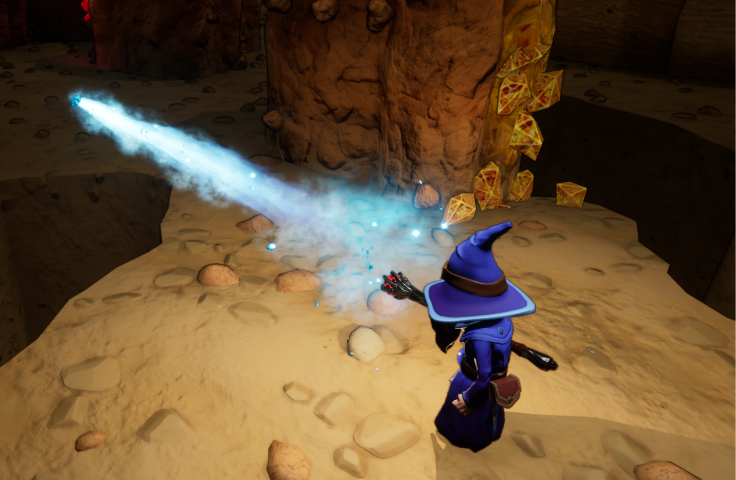
Unreal Engine has your back for the most part, its in-built replication and multiplayer support is pretty robust. Character controllers automatically let you control your own character responsively, while keeping it in sync for everyone else. It even comes with the Gameplay Ability System, which helps you deal with local prediction of many things (such as changes in attributes, and visual effects).
But there’s one area where you’re on your own, and that’s projectiles. How can you make these feel good to the client that’s initiating them, but still be consistent for everyone else? This blog post describes one way.
Caveats:
- I am not a netcode expert. I’m writing this because it was tough to find good written resources on it, and it also serves as a reminder for myself when I struggle to understand my own code later. 😅 So if I’m being wrong on the Internet, tell me nicely on Mastodon
- This only deals with projectiles. I’m not covering hit-scan weapons, that’s a whole other problem.
- Our game isn’t PvP or competetive, so I may be being looser than would be necessary in that environment
- I’m mostly talking about simple linear projectiles in this example, although I’ll mention other complications
First, let’s discuss things that don’t work. 😀
Basic mode: Spawn on server & replicate
The simplest possible thing you could do would be to just spawn your projectiles on the server, and have them replicate to everyone.
- Client A wants to fire a projectile
- They call a Server RPC to do this
- Server receives the RPC, spawns the projectile
- Projectile gets replicated to everyone, including Client A
This seems fine, right? Except for Client A, the projectile appears much later than they expect, at least 2x the average network lag time between them and the server. Players will probably complain about unresponsive controls.

Let’s get weird: Client-authorative
We’re a PvE only game so cheating or local advantage doesn’t really matter, so how about we just let the client’s control their own projectiles?
- Client A wants to fire a projectile
- They just fire it! It immediately appears in the world & feels good to them
- They also call a Server RPC so everyone else will see it
- Server receives the RPC, spawns the projectile
- Based on the network lag to the client, the server fast-forwards the projectile a bit to reflect how far it would have moved on the client since they sent this message
- The projectile is replicated to everyone except Client A (via overriding IsNetRelevantFor)
- When the projectile interacts with something on Client A’s machine, they perform extra RPCs to ask the server to apply effects such as damage, and to kill the server’s version of the projectile
This works … ish. For the client firing the projectile, it feels great, the best of all the options because it’s basically like being a single-player game. It definitely means the client could cheat, but as mentioned we’re PvE only so it doesn’t really matter. But that wasn’t why I didn’t keep this version.
The first major problem is the server fast-forward step. It’s entirely necessary in order for the projectile to appear in pretty much the same exact location as on Client A, given a starting location, direction, velocity and time lag. But it means that for fast-moving projectiles, every single one will appear for every other player quite far in front of the character that fired it. It looks super weird.
The second problem is that the client has to make a Server RPC every time it wants to have the projectile affect something. This is actually quite clunky; you really want to keep all your game logic running on the server, but now the events that trigger world changes are being decided on a client end (and we’re not worrying about cheating here in PvE), which complicates your mental model of where things occur and can cause discrepancies. What if 2 clients both thought they killed a monster?
The final problem is that if the projectile is not deterministic, for example it bounces off other moving objects, or is affected by physics, the version that everyone else sees can be wildly different to the one the controlling client will see. This is a source of very wacky results where a player throwing a grenade will see something normal, but everyone else will see an explosion go off in a completely different location to where they saw the grenade bounce.

So while this option feels really good on the clients that initiate the projectiles, it has too many problems in practice.
Final form: Client prediction, Server authority
That leads us to basically the only conclusion, and one you might have expected: we predict the projectile on the client, but the server is the one that truly controls it. We just need a way to mash those things together in a way that looks the least weird for everyone. Because it’s never going to be perfect, unless we go back to LAN parties (Can we do that? No? OK fine 😒)
There’s lots of things within this you can do to achieve that goal. Let’s start with the basics:
- Client A wants to fire a projectile
- They fire it locally, as a predictive actor
- They also send a Server RPC to request that an authorative version is spawned
- Server receives the RPC, spawns the projectile
- Based on the network lag to the client, the server fast-forwards the projectile a bit to reflect how far it would have moved on the client since they sent this message
- The projectile is replicated to everyone, including Client A
- When Client A receives the replicated version of the projectile, they sync them up (more detail later)

So now, we have a server-authorative projectile which is convenient for keeping all our interactions in one place where they won’t conflict, and the local client still sees a responsive projectile when they fire it. So, we’re done? Not quite.
This still looks a bit weird on the (listen) server and other clients, because for them the projectile can still spawn quite far ahead of where the Client A is. The fast-forward on the server to account for lag is entirely necessary; if we don’t do it, the server will think the projectile hasn’t travelled as far, and during the “sync” stage on Client A it will be forced to pull the projectile backwards, or slow it down for a bit, to sync up with where the server says it is. That feels bad.
So how do we square this circle?
Adding back some client delay, then hiding it
You read that right: to fix this, we’re actually going to delay Client A’s prediction a little. WHAT??!! Wasn’t the whole point of moving away from the simple non-predictive server RPC to avoid the delay for Client A?
Yes. But, it turns out what we need to do is “split the difference” a little. A little extra delay for Client A as a trade-off can improve the feel for everyone else. How much you do this depends on your game - maybe half the ping time is a good place to start. Client A sends the server RPC immediately, but then delays the creation of their own predicted projectile by a pre-defined amount. On the server end, we don’t have to fast-forward as much when we account for that delay, so overall the average experience for everyone is in a better spot.
However, that’s not the full story. there’s another trick you can use to almost completely hide the perceived delay on Client A, provided your “fire” animation has some amount of “wind up” before the actual firing event. In our case, we have wizards who have to raise their staff before the fire event happens, so we have a built-in “wind up” period.
If we send the Server RPC during that “wind up” instead of at the expected moment of firing, we can get ahead of things. Then, the delay we add locally is partially or even completely absorbed into that “pre-fire” period, and Client A sees almost the same result as when they controlled everything locally.
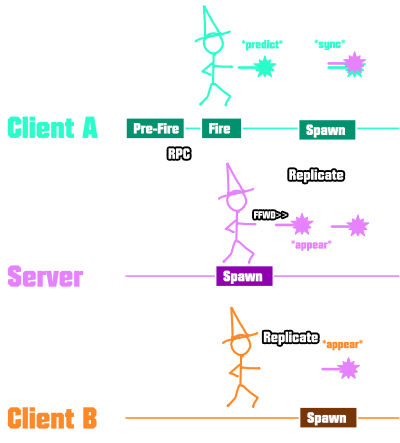
This is the final version I ended up using in our game. It wouldn’t work as well for insta-fire projectiles, because you’d have no wind-up to absorb the client delay in. And if you have hit-scan weapons like guns, you’d need a completely different solution (really just an RPC, and the server would have to rewind all possible targets by the lag to check hits). But for discrete projectiles where you have a wind-up animation, like our spells and also thrown grenades, it works pretty well.
Unreal Specifics
So far I’ve only talked about the theory of how you implement this; now let’s talk about how you make it work in Unreal.
The Client Predicted Actor Class
I have a base class in my project which all client-predicted actors derive from. You could do this as an Actor Component if you wanted to be more modular, but for me making it a base class was simpler, since I then make subclasses for linear projectiles and other locally predicted things.
UCLASS()
class AStevesClientPredictedActor : public AActor
{
	GENERATED_BODY()
Identifiers
In order to match up actors which get replicated back from the server with their locally predicted versions, you need a
client-local identifier for every predicted actor, which is communicated to the server in the RPC. This identifier
needs to be allocated as soon as you’ve committed to spawning a client predicted actor: and the
ID will exist before any actors do (the predicted client actor is delayed, and the server one hasn’t replicated back yet).
I simply use a uint32 which I reserve on my Player Controller.
   /// Local-only predicted actor ID (fine to wrap eventually)
	uint32 NextPredictedActorID = 0;
Because I only use this for short-lifetime actors, it’s fine for these IDs to wrap around eventually. I could probably
easily get away with a uint16 to be honest, but might as well code defensively for the sake of 2 bytes.
During the “Pre-Fire” event, I call the player controller to allocate a new ID:
const uint64 ProjectileID = AStevesClientPredictedActor::GenerateClientID(WorldContext);
This helper static function just wraps a few housekeeping lines for convenience:
uint32 AStevesClientPredictedActor::GenerateClientID(const UObject* WorldContext)
{
	if (auto PC = Cast<AStevesPlayerController>(GEngine->GetFirstLocalPlayerController(WorldContext->GetWorld())))
	{
		return PC->RequestPredictedActorID();
	}
	// Should never get here
	check(false)
	return 0;
}
The player controller actually does a little bit more than just return NextPredictedActorID++;, because we need to
record this ID and wait for the client predicted and server replicated versions of the actors. I track this in a structure:
struct FStevesPredictedActorInfo
{
   /// The identifier. This is separate from the actor because we can create the ID first,
   /// then delay creating the client actor, so we need to know the *intended* ID
   uint32 ClientActorID = 0;

   /// The client predicted actor. Hopefully should be created before the server one replicates
   /// back to us, but in the case of a mis-prediction of lag, the server might send us the actor first
   TWeakObjectPtr<AStevesClientPredictedActor> PredictedActor;

   /// The server replicated actor.
   TWeakObjectPtr<AStevesClientPredictedActor> ReplicatedActor;
};
/// Client predicted actors that are owned locally, waiting for the server copy to match up with
TArray<FStevesPredictedActorInfo> PredictedActors;
And then when I request a new ID, I create one of these, ready to be filled in with actors:
uint32 AStevesPlayerController::RequestPredictedActorID()
{
	const uint32 NewID = NextPredictedActorID++;
	PredictedActors.Add(FStevesPredictedActorInfo( { NewID }) );
	return NewID;
}
Once I’ve got this ID, provided this isn’t the listen server, I send the Server RPC which requests the spawning of the projectile on the server (I won’t describe this, it’s standard), and pass the ID with it.
One thing that is worth noting is how I set the ID during spawn. It’s vital that the ID is assigned to the actor immediately after construction, and before
BeginPlayand any replication. I do this using theCustomPreSpawnInitializationparameter onFActorSpawnParams:// This happens in my ACharacter subclass so the owner is our character, and ultimately the player controller FActorSpawnParameters Params; Params.Owner = Params.Instigator = this; Params.CustomPreSpawnInitalization = [bIsOwningClient, ClientID](AActor* Actor) { // Do the ID init here, before BeginPlay & replication if (auto PA = Cast<AStevesClientPredictedActor>(Actor)) { PA->SetIdentifier(ClientID); /// You should determine this value yourself based on whether this is the local creation, or the Server RPC /// It just sets the "bIsPredictedCopy" internal variable which lets us differentiate on the local client PA->SetIsPredictedCopy(bIsPredicted); } }; GetWorld()->SpawnActor<AStevesClientPredictedActor>(Loc, Rot, Params);
Calculating Delays
There are 2 ways in Unreal that you can measure lag. First, PlayerState has a GetPingInMilliseconds function - this is
a replicated property that represents the expected ping as replicated back from the server. It’s not exact, but it’s a
decent estimate. This is what I use to base my client predicted actor delay on.
Secondly, on the server end, you could just measure the time difference. Every client has an idea of what the server time is,
via the Game State object’s GetServerWorldTimeSeconds function. You can just send that time from the client with the spawn RPC,
then on the server subtract it from the current GetServerWorldTimeSeconds, and that’s your lag for that call.
Of course, when calculating how much to fast-forward, you must also then subtract the client delay. You can either send that with the RPC, or just base it on the same PlayerState ping value - since the client is getting that from you anyway, it should be representative (barring spikes).
Matching up Predicted and Replicated actors
On the local client, when it’s not the listen server, there will eventually be 2 copies of the actor. Both will be
owned by the local player controller, assuming you created them with an Owner of the Character, and both will have the
same ID (only unique locally). We can only tell which one is which by the bIsPredictedCopy member variable, which is
set on creation (it doesn’t even have to be replicated since it will only be true for the local client).
To figure out whether we own a projectile:
bool AStevesClientPredictedActor::IsLocallyOwned() const
{
	if (auto World = GetWorld())
	{
		if (auto PC = GEngine->GetFirstLocalPlayerController(World))
		{
			return IsOwnedBy(PC);
		}
	}
	return false;
}
Next, let’s think about ordering. Usually the client predicted actor will be created first (that is after all the point). However, it’s possible that because we delay the client creation, if something happens so that our delay exceeds the round trip time to the server, the server replicated version might arrive first. It’s unlikely, but imagine if you’re basing your client delay on a ping value and a lag spike happens. If you delay by that, and the network recovers in between, it’s possible.
For that reason we don’t assume what order the actors will be created in. Once both of them have been linked up, we start to synchronise them.
I chose to do this in the BeginPlay function of the predicted actor:
void AStevesClientPredictedActor::BeginPlay()
{
	// This could be:
	// 1. An instance on the listen server: nothing to do
	// 2. A predictive instance on the owning client : look up the predictive record by ID, update predicted
	// 3. A replicated instance on the owning client : look up the predictive record by ID, update replicated
	// 4. A replicated instance on a non-owning client : nothing to do

	if (IsLocallyOwned() && GetWorld()->GetNetMode() == NM_Client)
	{
		if (auto PC = Cast<AStevesPlayerController>(GEngine->GetFirstLocalPlayerController(GetWorld())))
		{
			// If either of these paths matches us up with our counterpart, will call LinkReplicatedWithPredicted
			if (bIsPredictedCopy)
			{
				// Register ourselves so we can match up
				PC->SetPredictedActor(ClientActorID, this);
			}
			else
			{
				// We're the server copy, having been replicated back to the owning client
				PC->SetPredictedActorReplicatedActor(ClientActorID, this);
			}
		}
	}

	// Important to do this last so that BP knows what happened
	Super::BeginPlay();

}
The implementations of these functions are pretty straight forward; just find the ID entry we previously created, and hook up the actors. Once both are known, start the sync process.
void AStevesPlayerController::SetPredictedActor(uint32 ID,
	class AStevesClientPredictedActor* PredictedActor)
{
	if (auto pInfo = PredictedActors.FindByPredicate([ID](const FStevesPredictedActorInfo& Info)
	{
		return Info.ClientActorID == ID;
	}))
	{
		check (!pInfo->PredictedActor.IsValid());
		pInfo->PredictedActor = PredictedActor;

		// If both are valid, link up
		if (pInfo->PredictedActor.IsValid() && pInfo->ReplicatedActor.IsValid())
		{
			pInfo->ReplicatedActor->LinkReplicatedWithPredicted(pInfo->PredictedActor.Get());
		}
	}
}

void AStevesPlayerController::SetPredictedActorReplicatedActor(uint32 ID,
	class AStevesClientPredictedActor* ReplicatedActor)
{
	if (auto pInfo = PredictedActors.FindByPredicate([ID](const FStevesPredictedActorInfo& Info)
	{
		return Info.ClientActorID == ID;
	}))
	{
		check (!pInfo->ReplicatedActor.IsValid());
		pInfo->ReplicatedActor = ReplicatedActor;

		// If both are valid, link up
		if (pInfo->PredictedActor.IsValid() && pInfo->ReplicatedActor.IsValid())
		{
			pInfo->ReplicatedActor->LinkReplicatedWithPredicted(pInfo->PredictedActor.Get());
		}
	}
}
There is also a “RemovePredictedActor” which is called in
BeginDestroy, but we’ll skip that.
Replicated and Predicted Actor Sync
So what do we do to sync things up? One school of thought says to simply destroy the predicted actor and use the replicated one from then on (perhaps with a little lerping to bring the predicted actor into line first). This is the simplest apporoach, but it doesn’t work very well if your predicted actor has particle systems - which for projectiles, is pretty common. If you just swap them, there’s a noticeable jump between the local particles and the server particles, which naturally start later. You could do a cross-fade perhaps, but instead, I choose to:
- Hide the server replicated actor visually
- Keep the predicted actor, but lerp it into the same position as the server replicated actor
- Make the predicted actor listen in on important events on the replicated version; most importantly destruction, but also anything that might change visuals (e.g. impact effects)
The process is started by LinkReplicatedWithPredicted:
void AStevesClientPredictedActor::LinkReplicatedWithPredicted(
	AStevesClientPredictedActor* PredictedActor)
{
	// We're the server copy, having been replicated back to the owning client
	// The client predicted version will be our visual
	// Hide ourselves
	SetActorHiddenInGame(true);
	// Also set the client version to not collide or react in any way, server will do this
	PredictedActor->SetActorEnableCollision(false);
	PredictedActor->FollowReplicatedActor(this);
}
The FollowReplicatedActor function is a BlueprintNativeEvent which can be overridden for subclasses which need to listen
in on more events. The base version just stores the actor it’s following, and listens in on the OnDestroyed event.
Everything else is done in the tick:
void AStevesClientPredictedActor::Tick(float DeltaTime)
{
	Super::Tick(DeltaTime);

	if (FollowedServerActor.IsValid())
	{
		UpdateFromFollowedActor(FollowedServerActor.Get(), DeltaTime);
	}
}

void AStevesClientPredictedActor::UpdateFromFollowedActor_Implementation(
	AStevesClientPredictedActor* FollowedActor, float DeltaTime)
{
   // Keep the visual actor pulled towards the replicated one
	SetActorLocation(
		FMath::VInterpTo(GetActorLocation(), FollowedActor->GetActorLocation(), DeltaTime, 10));

	SetActorRotation(
		FMath::RInterpTo(GetActorRotation(), FollowedActor->GetActorRotation(), DeltaTime, 10));
}
Subclasses can override UpdateFromFollowedActor if they need to track more state.
Conclusion
Phew, this was a long one. As I said in the caveats section, I’m not a netcode expert, but this is the set of solutions I found worked for me, based on snippets of information I found around the Internet. I wrote this because I couldn’t find much in the way of advice in a concise fashion - the Gameplay Ability System has been really useful to me for getting multiplayer working, but basically abandons you when it comes to projectile prediction, and most of the industry information is buried in hour-long videos from over the years, and aren’t about Unreal implementations.
I hope this is useful to someone else in the future!